How to change location of the task database file?
As default the task database is stored as a single file in the following location: C:\Users<YourUsername>\Documents\DesktopReminder\tasks.dr3.mdb or %UserProfile%\Documents\DesktopReminder\
Sometimes you need to share the database file in your local network, or store it in another, secure location.
To change location of the task database file:
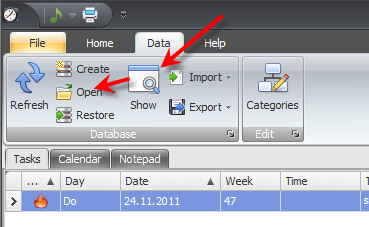
- Select the Data ribbon page (main menu item) in Desktop-Reminder.
- Press the Show button. Windows Explorer opens and selects the current task database file.
- Copy this file with Windows Explorer to a target location.
- Click the Open button and select the task database file from the target location.